Fundraising Essentials
First, let's take a look at market & hiring insights
Use Carta's Market Insights feature to gain essential data for fundraising and hiring, allowing you to make informed decisions and strategically plan for growth.

WHY IT MATTERS: By accessing data driven insights, you can optimize your fundraising strategies and ensure your hiring packages are competitive
Start by navigating to View market insights under your Essentials tab
For Priced Rounds, view data on:
Distribution of Valuation
Median Cash Raised
For SAFEs, view insights on:
Distribution of Valuation Caps
Commonly appearing terms in SAFEs
Companies categorized by the number of investors in a SAFE round
For hiring, you can better understand:
Compensation Benchmarks: Understand how much to pay early hires based on salary and equity benchmarks from Carta Total Compensation
Determining Option Pool Size: Use data insights from Carta to guide your decision on the size of your option pool
First Hire Equity Benchmarks: Understand how much equity companies are granting to their first hires
Model the effects of fundraising on your cap table
Whether you’re inputting SAFEs, convertible notes or a priced round, Carta makes it easy to understand the impact on your company’s cap table
WHY USE CARTA:
Building these models from scratch can be time consuming and difficult. With our modeling tools, quickly and accurately model your round.
SAFEs & Convertible Notes: A few simple inputs and you’re ready to go
Carta's SAFE financings tool can help you generate SAFE documents, send them to investors for signature, and track everything effortlessly in one place
Priced Rounds: Get a high level preview of the impact of one or multiple priced rounds
Consider how to adjust your option pool during a financing round
Understand how previous convertible notes or SAFEs will convert with the round
Indicate pro-rata rights to understand the dollar amount required for existing holders to maintain current ownership percentages
Deal Ready Pro-Forma: Generate an accurate pro forma with iterative calculation capabilities
This is our most advanced modeling tool
Covers the nuances including advanced terms, pro-rata allocation based on NVCA or custom percentages, promised options, and much more
Easily exports to share with your law firm, investors, or admin team
Reports you may need & how to run them
When preparing for a raise, you may have multiple parties asking for reports. With Carta, your report data is constantly updated, using real-time data from cap table activity.
The reporting suite can be found under your Essentials or Cap Table tabs
Quickly and easily search for the reports you need
After exporting, find your reports in your Downloads tab
Here are some reports you might need during the fundraising process:
Detailed cap table report: We recommend checking the settings ‘Detailed’ and ‘Securities ledger by type and class’ when exporting.
This will give you the most detailed view of your cap table.
Set up your data room
You can streamline the exchange of critical information during the due diligence phase using our data room feature, which is included with all Carta subscriptions.
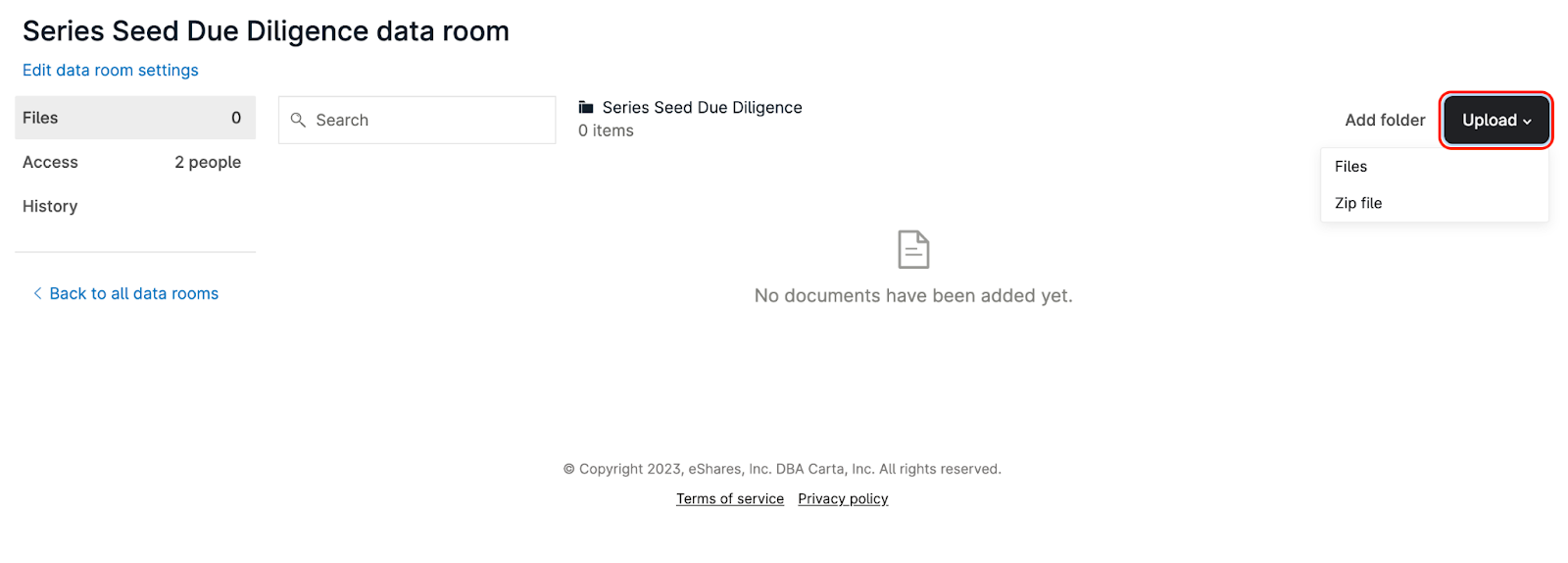
Navigate to the Documents tab to set up a data room. Features include:
Managing access for current stakeholders, your team or potential investors
Requiring an NDA to be signed before accessing
Watermarking PDFs or disabling document downloads
Tracking who has viewed your documents or accessed your data room
WHY IT MATTERS: A data room simplifies the exchange of legal information, enabling authorized parties to access documents securely. This ensures a smooth legal process, can speed up the closing process and increase investor confidence.
A potential investor does not need to be on your cap table to be added to a Data Room
Easily generate & issue SAFEs to effortlessly track everything in one place
With the SAFE financings tool, you can generate SAFE documents, send them to investors for signature, and track funds online.
This automated process not only saves founders time, but also eliminates the hassle of managing and wrapping up funding
Create SAFE documents and tailor your specific terms or
Add existing SAFEs to be reflected on your cap table immediately
Choose to fund online via Carta or provide offline wiring instructions and once funds are confirmed, SAFEs are automatically issued
Your security in mind:
To fund your SAFE online through Carta, your company needs to complete a process called Know Your Customer or KYC. Completing the KYC process ensures everything runs smoothly when you're raising funds or handling financial activities
Adding & managing stakeholders
It’s important to understand how to add and manage stakeholders to avoid administrative mistakes and maintain strong data integrity.
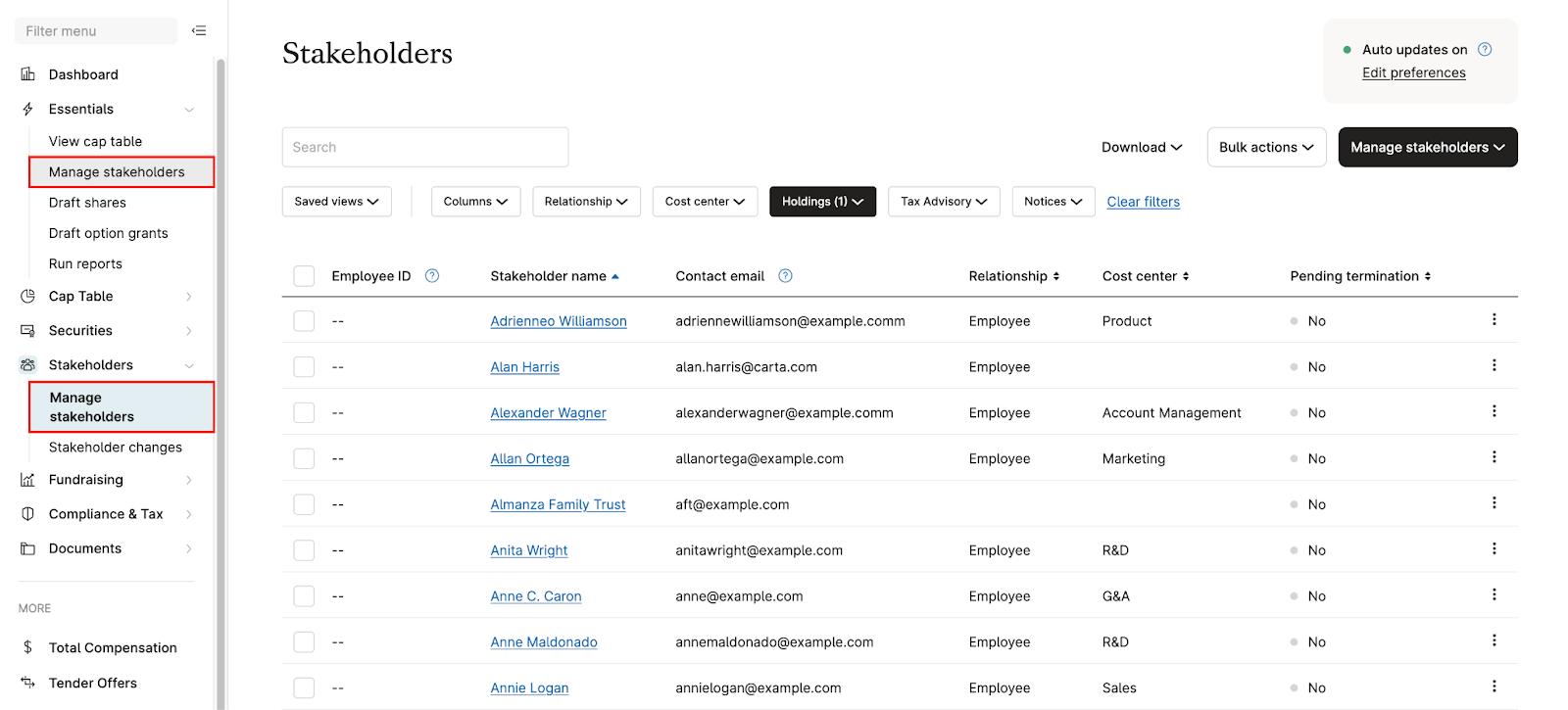
You do not need to add a stakeholder to your ledger before issuing them securities for the first time, they are automatically added to the ledger after you issue them securities
MANAGING STAKEHOLDERS: You can take various actions to manage stakeholders individually or in bulk. A few reasons you may need to manage your stakeholders include:
Name change or spelling mistake
Update the email they receive Carta notifications to
Remove duplicates on the ledger
Updating stakeholder details such as relationship, Cost Centers, employee IDs and more
TERMINATING STAKEHOLDERS: Terminating a stakeholder from the ledger will ensure that they no longer earn any unvested shares, and that those unvested shares are returned to the equity pool
WHY IT MATTERS: Your stakeholder count is based on the number of unique names on the cap table. A stakeholder or investment fund holding multiple securities will count as a single stakeholder.
A stakeholder is defined by any person or entity who holds an outstanding security
Integrating your HRIS system streamlines the process for adding and managing stakeholders
Communicating with investors & other key stakeholders
During the fundraising process, you may need to communicate company updates, pitch decks, legal disclosures, or other messages.
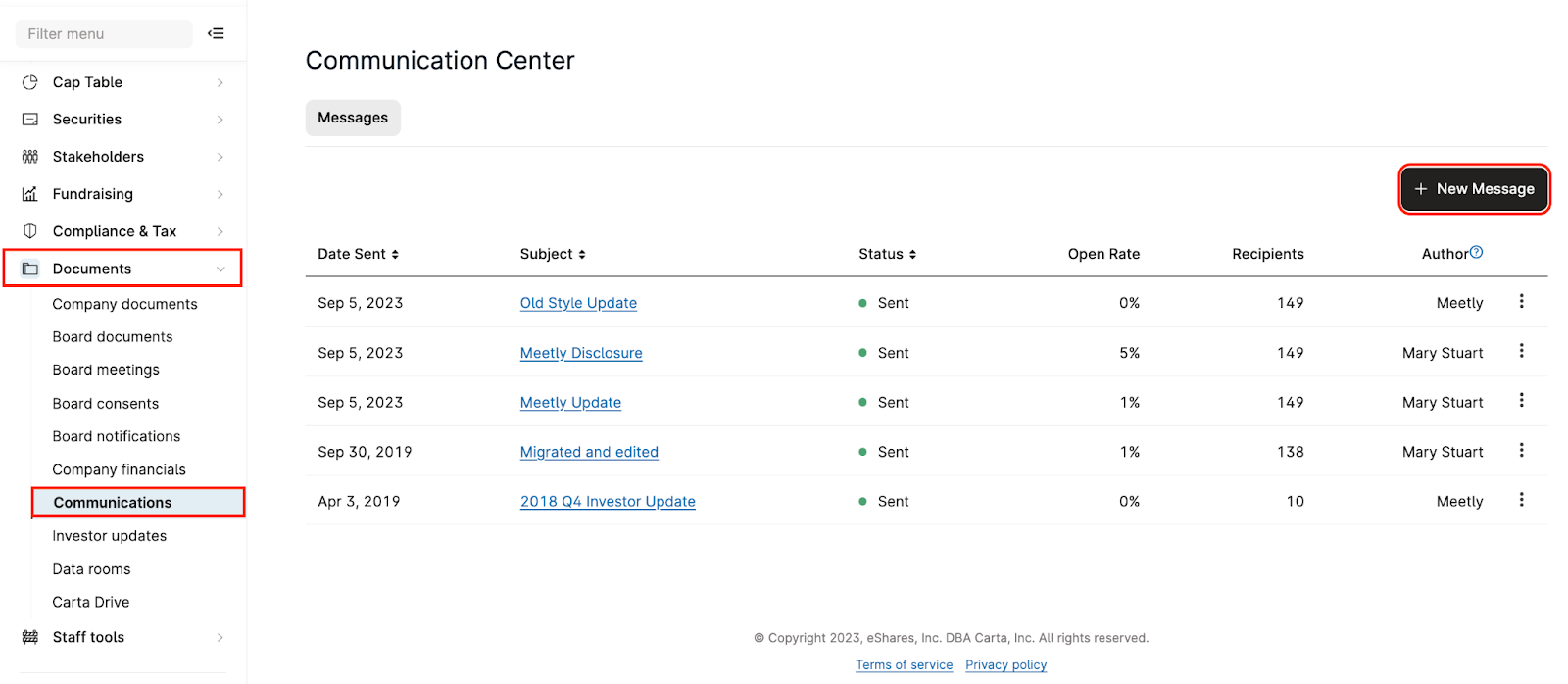
WHY USE CARTA:
Keep all communication in one place to keep your team organized and your data secure
Add recipients individually or by cap table relationship (as well as recipients who are not on the cap table)
Be able to track which recipients have opened a message
Allow recipients to leave private comments for the sender and have a secure conversation on Carta
Navigate to the Documents tab to draft a message from scratch or use one of our templates
Recipients will receive an email notification directing them their Carta inbox to view your message
Access your Carta inbox under your name in the top right corner